Thursday, May 5, 2011

An open letter to Foxtel and their suppliers

I was waiting for Date Night and Kick Ass to come back to your "On Demand" service so it could watch "what I want, when I want" since they were removed since the launch last October.

In January when I asked about the movies, you said:
I appreciate the time you have taken to contact us regarding New Release Movies On Demand. These movies are constantly rotating and changing to give FOXTEL subscribers, the continued option of watching what they want, when they want. The movies will be back on FOXTEL shortly, and they will be advertised to our subscribers when they are scheduled next.  
Last weekend, I gave up waiting, and borrowed the DVDs from a friend.

I would have preferred to stream them through Foxtel if they had been available, because borrowing (and returning) DVDs takes more effort than simply clicking through a few menus from the couch, but it was an effective way of watching "what I want, when I want".

I thought you might like to pass this on to your upstream suppliers and let them know that, because they have neglected to update their knowledge of marketing since the last century, they missed out on revenue they would have received had I been able to watch them "On Demand".

Thursday, February 17, 2011

Emacs renumber tut tests

M-x replace-regexp
test<\([0-9]+\)>()
test<\,(1+ \#)>()

IronPython and ntemacs

  • Install python-mode.el
  • (setq py-jython-command "c:/Program Files/IronPython 2.6 for .NET 4.0/ipy.exe")
  • Open a .py file. C-c C-t will toggle "jython", C-c ! will start a shell... (thanks shapr!)

Saturday, January 1, 2011

Boxee Kinect remote control - don't panic

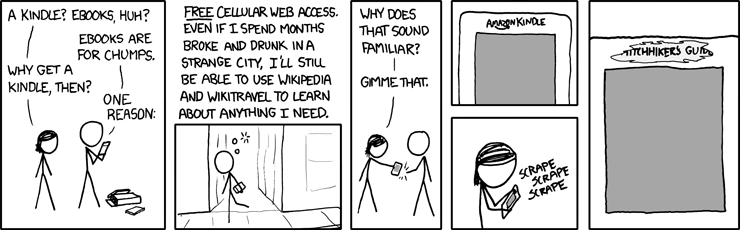
There's a Kinect-based remote control for the Boxee media centre. Douglas Adams predicted this over 30 years ago in The Hitchhiker's Guide to the Galaxy:
For years radios had been operated by means of pressing buttons and turning dials; then as the technology became more sophisticated the controls were made touch-sensitive -- you merely had to brush the panels with your fingers; now all you had to do was wave your hand in the general direction of the components and hope. It saved a lot of muscular expenditure, of course, but meant that you had to sit infuriatingly still if you wanted to keep listening to the same program.

Thursday, May 27, 2010

I am a mug

And upgrading Ubuntu is a mug's game.

I had a perfectly functioning server running 9.10. I upgraded to 10.04 today, and:
  • Samba is broken. I thought it might be a password problem so I reset the password. I reloaded smbd, no dice. Maybe it's a permissions problem? Unmount, check, remount, no dice. The logs showed nothing. A few other dead ends before I spent ten minutes googling and discovered that the defaults are now no good for me. I had a symlink in a share, and it won't follow symlinks by default. To fix it, I added this to smb.conf and restarted smbd:
   follow symlinks = yes 
   wide links = yes
   unix extensions = no
  • My 2nd hard drive stopped being recognised. Ten more minutes of googling to learn that I needed to go into BIOS and turn off floppy support. I don't have a floppy drive in the machine, so I don't know why it was on in the first place, but it used to just work in 9.10.
Instead of watching TV (off the networked file share) I have spent half an hour stuffing around with settings. A relaxing evening was spoiled by Canonical breaking backwards compatibility. I think this shall be my last Ubuntu upgrade for this server. (It will probably keep running Ubuntu, but I won't upgrade it again.)

I have since discovered that Ubuntu also has some compiler warnings enabled by default in their distribution of gcc. This is the stuff that Microsoft got bagged for when they started telling people strcpy was deprecated, and it's not OK. Prefix your builds ubuntu- or something, don't mess with vanilla gcc. Messing with defaults without making it extremely obvious leads to surprises, and surprises are bad.

Monday, May 24, 2010

Submitting MacPorts patches is simple and fun

I just followed the HowTo, and look! google-test is updated to 1.50.

Out of habit, I had installed it manually, but then a little voice in my head told me to check MacPorts. I did, but the version there was 1.40. I spent about five minutes wondering what to do when I came across the HowTo, and now:

  1. I have it installed with port, so it will update automatically and stuff
  2. I've got the warm feeling of contributing something
This is how I'll install stuff in the future!

Saturday, May 22, 2010

Oh no! It's the pinky ponk!

So my pinky is feeling a little sore from the terribly placed control key. I tried mapping caps lock as control, but for some reason I automatically go straight for the one in the corner. I've been idly wishing that a Space Cadet keyboard would just show up at my door, but that hasn't worked. Time for some action.

The poor man's path is to just monkey with the keyboard settings.


Caps Lock should die. Unless you're a vi user and are unable to press more than one key at a time, it is really a useless key. It's now my Command key. Ideally I'd like to make it Rubout but (a) Apple won't let me do that, and (b) there's a fine line between messing with settings and starting a Symbolics cargo cult.

Other than that, I just swapped Control and Command. Even though I'd already used Caps Lock as Command, I decided I wanted to get out of the habit of hitting it with my pinky.

One day in, I'm finding it works pretty well. I'm using Caps Lock for all my Command needs, rarely going for the remapped Control key. I am frequently hitting the wrong keys, but nothing disastrous has happened yet. Using Command as Control works great with all the Emacs-like bindings in OSX, and I'm using my new Right Control key all the time for stuff like C-d (delete forward), whereas I never really use it when I have a keyboard with a real physical Right Control. Having Control keys right next to the space bar is awesome.


How am I going to live a normal life with this keyboard layout? I don't know. Since I started using a Macbook at home, I keep accidentally hitting Alt like it's Command on the keyboard at work - key combos that a few weeks ago were burned into my muscle memory have evaporated. I figure if I'm already confused, a little more won't hurt!

If it works OK at home I'd like to use the same setup at work. My main concern is pair programming. I used to have my parens and brackets swapped (a la the Space Cadet) at work, and even though the guys I pair with were prepared to use my crazy setup, it kept breaking our concentration. I made a shortcut for flipping them back whenever I was pairing, but I ended up just leaving it as normal all the time. I loved having them swapped, but I didn't stick with it.

I'll see how long I can last this time. So far, so good...